

For decades, making your business multilingual meant a slow and expensive process of translating word-for-word. Now, with AI localization, every business can afford to go global. But simply changing the language is not enough; you need to capture the culture, the tone, and the market nuance for every single audience.
AI localization is not just a faster version of old-school machine translation. Based on Large Language Models, it produces translations that are tailored to specific local cultures rather than language-to-language interpretation.
Read on to discover how AI, combined with human expertise, is making it possible to launch international products faster.
Learn what the Crowdin platform is, and which localization tools can help you create AI-powered workflows to optimize your budget.
Editor’s Note: AI Technology moves fast. Tools that work today may be useless tomorrow. To make sure the content is always up-to-date, we review and update this article every few months with the most relevant insights and newest tools.
What is AI Localization?
AI Localization is the use of Artificial Intelligence (specifically, Large Language Models, or LLMs) to translate and adapt content for a specific target audience, culture, and market.
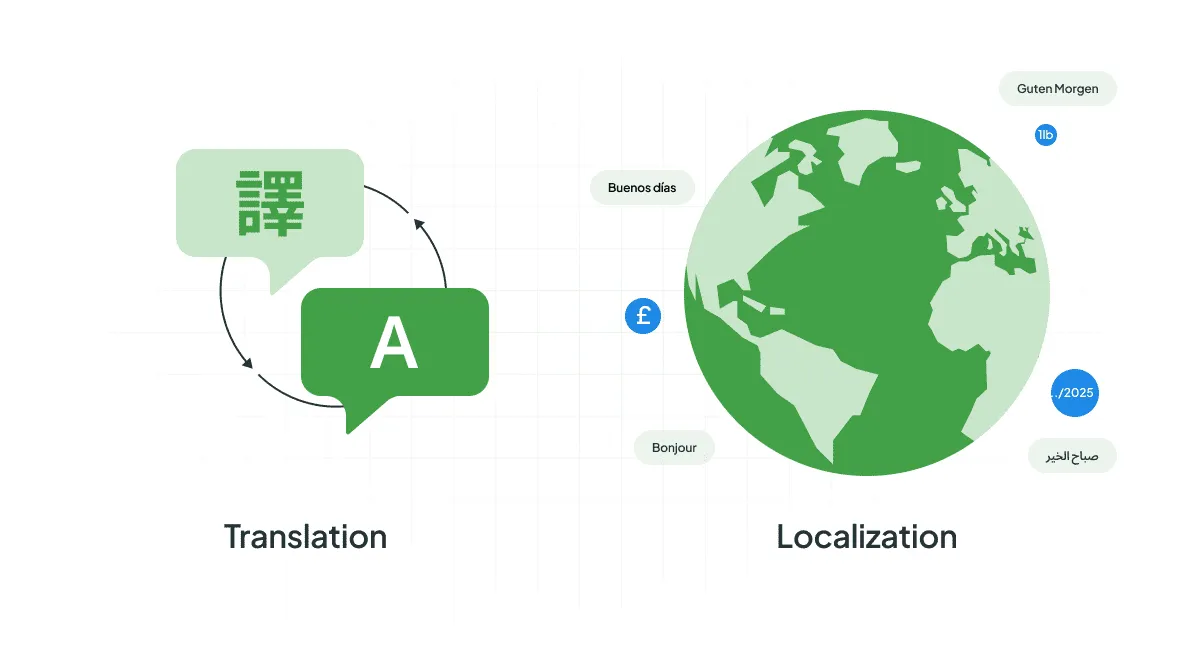
This process often includes transcreation, which is the creative rewriting of marketing and brand messages to deliver the same emotional impact in the target culture. Unlike translation, AI localization goes deeper than just word-for-word conversion.
AI Localization (LLMs) vs. Machine Translation (MT)
When most people hear “AI translation”, they think of tools like the original Machine Translation (MT) engines which operated mostly on rules or statistical models (e.g. older versions of Google Translate).
But there’s a big difference between MT and AI localization:
| Feature | Old Machine Translation (MT) | Modern AI Localization (LLMs) |
|---|---|---|
| Focus | Word-for-word replacement (or statistical patterns) | Context, Tone, Cultural Nuance, and Workflow Automation |
| Input | A string of text | Text plus brand voice, audience profile, technical terms (glossary), and UI screenshots |
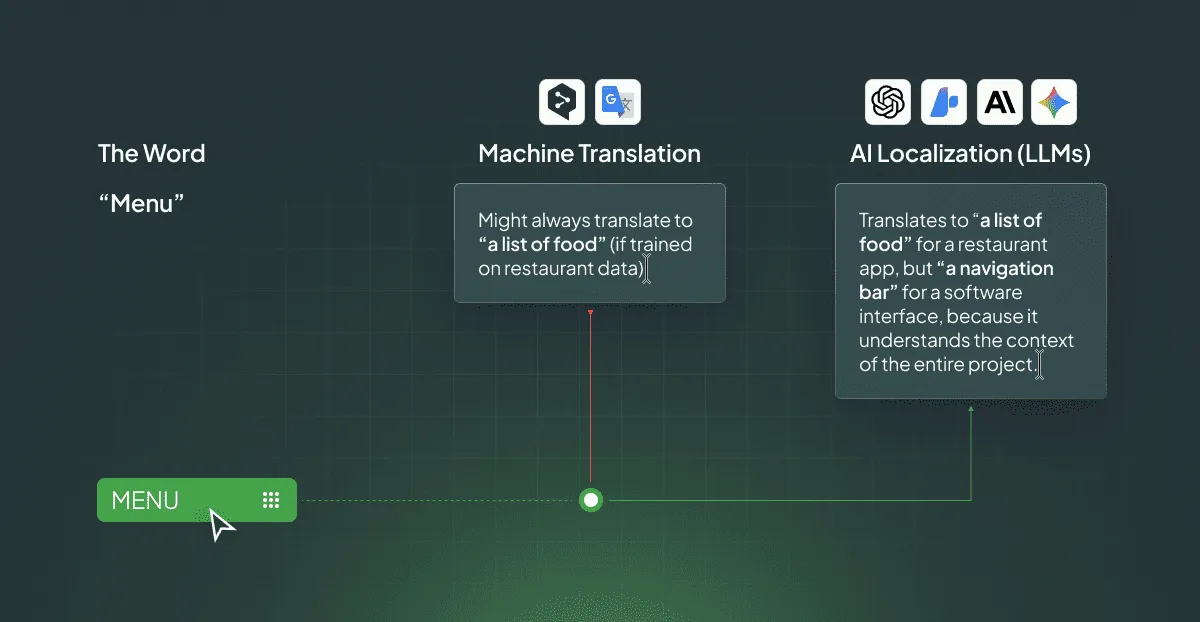
The secret sauce is context and nuance.
Traditional MT software often struggles with things like idioms (like “bite the bullet” – meaning to face a difficult situation) or industry-specific jargon. A DeepL survey found that 82% of respondents reported standard machine translation failed to accurately translate industry-specific jargon.
Modern localization, however, is built on Artificial Intelligence (specifically, LLMs). These models have been trained on vast amounts of data, giving them a much deeper, near-human grasp of language. They can be trained on your company’s specific brand voice and terminology, making the output consistently on-point. You can provide AI with any context you want, as you would to your vendor when discussing a translation project.
Case Study: How Polhus Achieved 75% Approval Rates with AI
The shift to AI localization already has measurable results in the real world. See the results of our client Polhus, who has successfully implemented AI-powered localization:
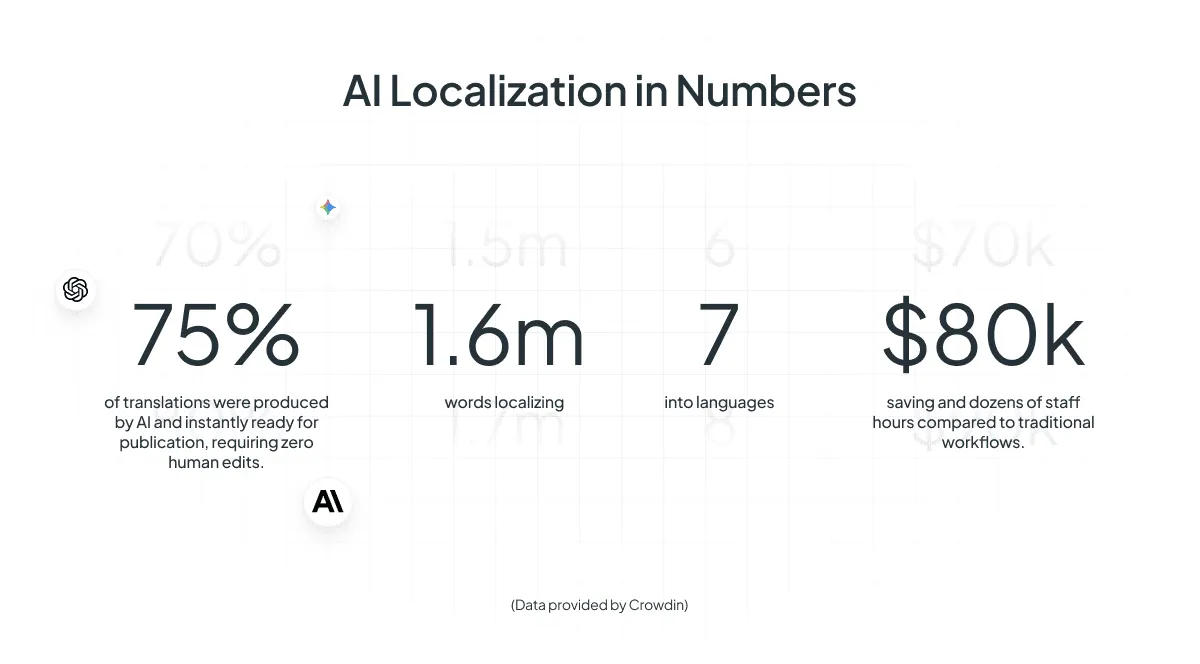
- Up to 75% of AI-generated translations were approved by human reviewers as publication-ready with no edits.
- Saved approximately $80,000 and dozens of hours by localizing 1.6 million words into 7 languages (compared to traditional methods).
AI localization allows companies to scale at a speed that was hardly imaginable just a few years ago.
Learn how Suitsupply switched to 100% AI localization
The AI Localization Process: LLMs + Human Review
There are different translation strategies, but in this guide, we discuss the hybrid approach (AI + Human). This is particularly effective for complex projects like SaaS localization. Just make sure you have internationalization (i18n) done before you begin.
1. Achieve Instant Translation with AI
Modern AI systems utilize advanced technology powered by LLMs, which work like this:
- Reads the whole message: It does not translate word-for-word. It reads the whole sentence or paragraph to understand the full meaning and tone.
- Instant, Contextual Translation: Leveraging its advanced understanding of the full text, the AI produces high-quality translations instantly.
- Consistency Check: The AI is trained on your brand’s voice and approved terminology. It automatically ensures you always use the correct term for your product, keeping your message consistent across every market.
We agree that for some content, AI translations are more than enough. But when it comes to business, sales, and marketing, human review is a must have.
2. Human-in-the-Loop Review
AI is great, but it is not perfect. It cannot feel emotion or understand a local joke. This is where the Human-in-the-Loop model takes over.
-
Cultural Tune-Up: A human expert (a linguist) reviews the AI’s work, focusing only on the tricky parts: slogans, idioms, or anything sensitive. They fix any cultural blunders.
Example: If your US marketing copy says, “Do not try to boil the ocean”, the AI may translate it literally. Here, humans change it for the local equivalent of “Focus on the essentials” to make it more suitable.
-
The Final Polish: They adjust things the AI misses, like making sure the text is short enough to fit inside a tiny mobile app button or changing the image on your landing page to one that resonates better with local users.
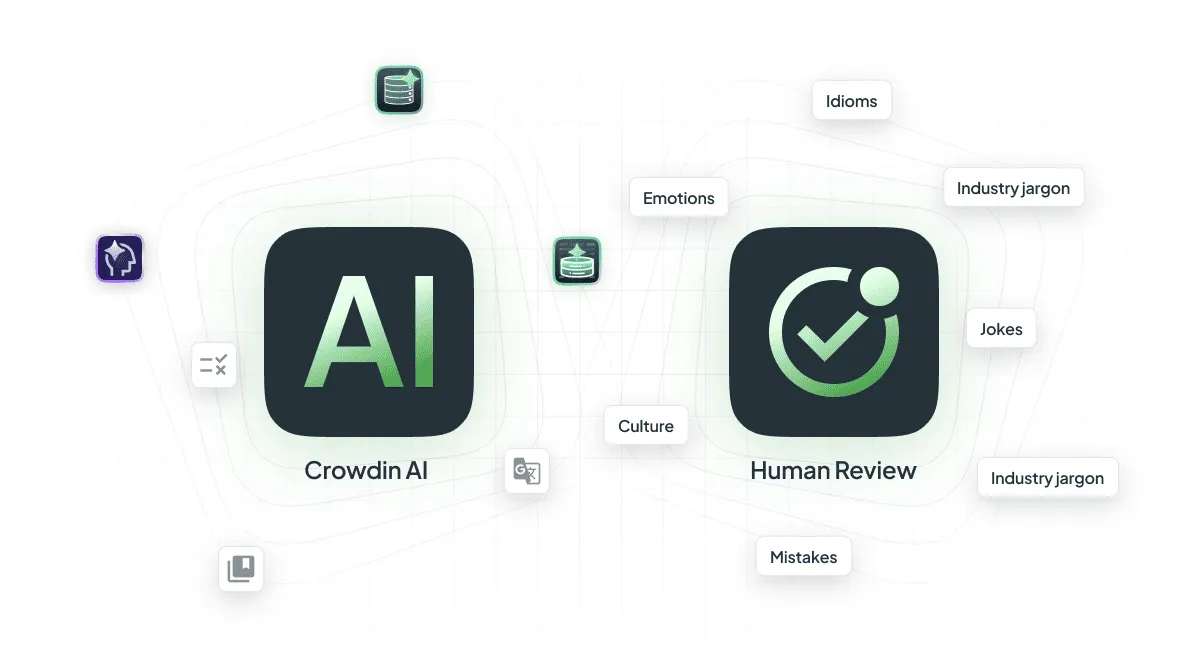
AI in localization is not about replacing people; it is about making them more efficient.
Old Way: Takes weeks to translate and check everything.
AI Way: Content is translated in minutes, and human experts focus on fact-checking, identifying, and correcting any inaccuracies that AI may provide.

3 Core Technologies Behind AI Localization (In Simple Terms)
Here’s a simple look at the three main things that make the magic happen:
1. Large Language Models (LLMs) for Translation
This is the brain that does the actual translating. LLMs are an advanced form of machine learning that uses deep neural networks. Instead of translating word by word, it translates entire sentences or paragraphs at once.
Imagine you are learning a new language by looking up every word in a dictionary (that’s the old way). Now, imagine you learn that language by watching a thousand movies and reading a million books. LLMs are like the second way – they see the whole picture and understand how the pieces fit together. They are fluent and can be instructed using human language (e.g., “Translate this using a friendly, casual tone”). This fine-tuning is what makes the output so much better.
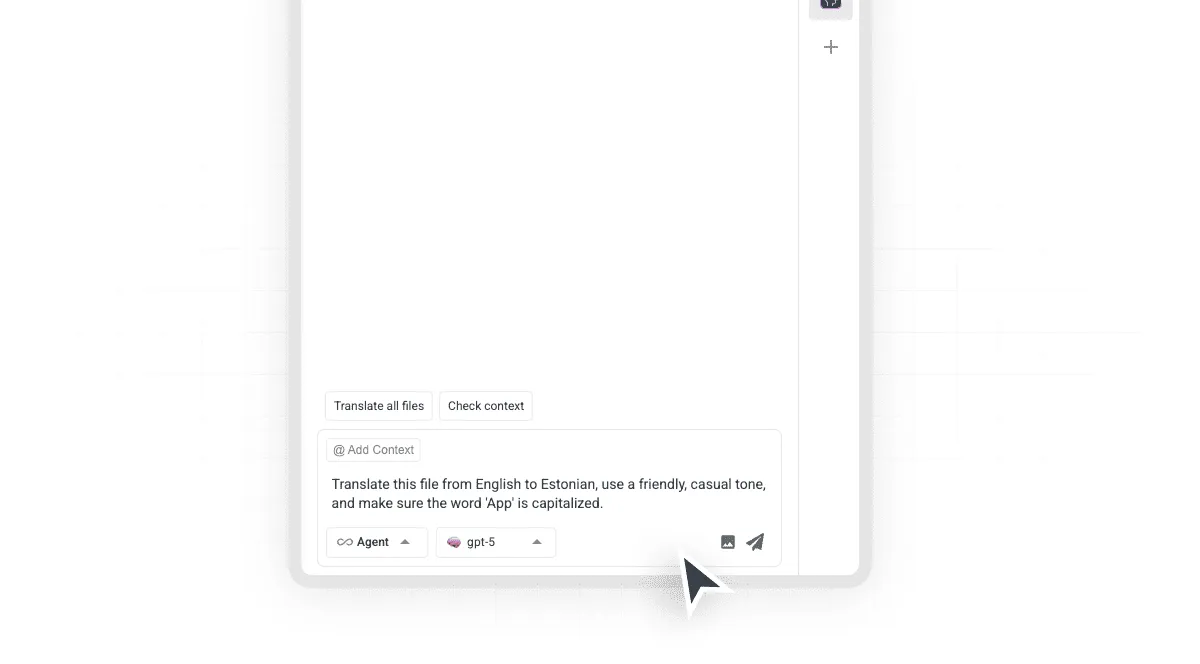
2. AI-Driven Quality Assurance (LQA)
AI-powered platforms like Crowdin use AI to actively check the quality of the translation before a human ever sees it.
AI-Driven Quality Assurance scans the translation against a set of rules, your brand’s specific terminology, and even the source code context. It catches:
- Inconsistent capitalization.
- Terms that don’t match your glossary.
- Length restrictions in mobile app interfaces.
- Missing punctuation.
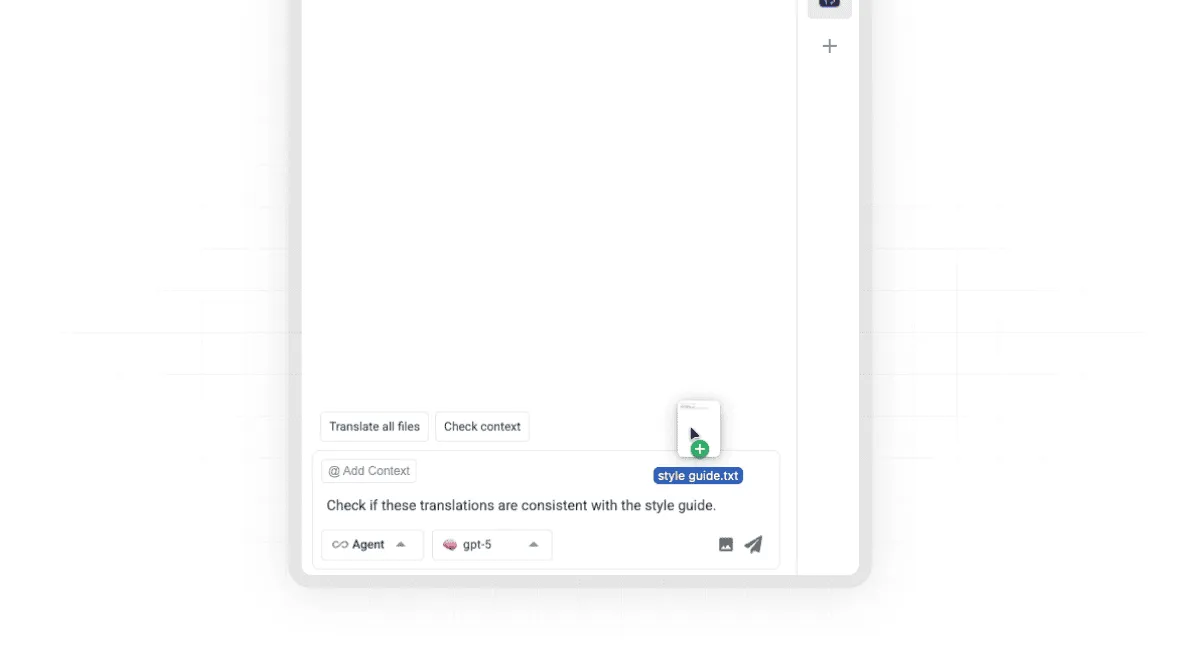
It even knows your company’s internal style guide. If your brand always calls a “customer” a “partner”, the AI will instantly flag any sentence that uses the wrong term. This makes the human reviewer’s job much faster, as they do not have to waste time on simple errors.
3. Workflow Automation (CI/CD)
The best part of AI localization is how it integrates with your business translation and development processes.
Workflow Automation involves connecting the translation platform directly to your content systems (like your website CMS, design files, or code repositories). AI does not just translate, it manages the content flow.
Imagine you release an update to your software. In the old days, you’d have to manually export all the new text strings, email them to a translation agency, wait for them to return, and then manually import them back into your code.
Workflow automation with AI:
- Sync: Once you have updated your code, strings that require translation are automatically uploaded into a translation management system (TMS).
- Context: Generate an AI context for strings so pre-translation will be more effective.
- Pre-translate: The next step is AI pre-translation. By using Context, Translation Memory, Glossary, and style guides, AI can generate good-quality translations.
- QA: Run an AI QA check: if all terms are consistent? Will the lengths break your design?
- Review: A human linguist focuses only on the complex or flagged sentences. They can use the AI agents for quick edits, rephrasing, or bulk changes.
- Deploy: Approved translations are automatically pushed back into your website or app code, ready for the next deployment.
- After that, you can also run localization tests.
AI transforms localization from a slow cycle with errors into a continuous flow that runs in parallel with development.
In the tech industry, AI-powered localization delivers massive gains. Crowdin’s client noted that integrating AI workflows resulted in content being produced 2 times faster and 3 times cheaper compared to older translation methods (read the case study with Ajax Systems).
5 Benefits of AI Localization Implementation
With AI, localization becomes an easy and fast way to grow your business. Let’s sum up all the benefits below.
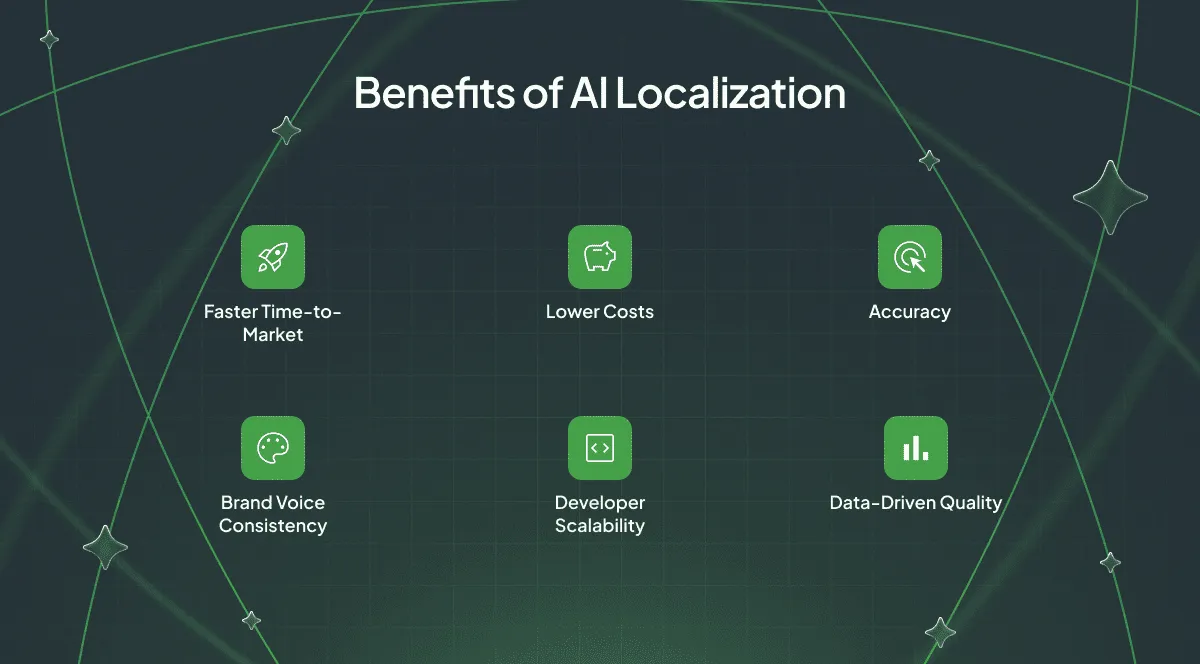
1. Faster Time-to-Market
Content is ready in hours, not weeks, allowing you to launch products across all markets simultaneously.
2. Continuous Quality Improvement with AI Learning
Every human correction teaches the AI, which is why it is constantly improving. The system generates reports highlighting content that needs pre-editing to improve all future translations.
3. Lower Costs
AI handles the bulk of the work, meaning you pay human experts only for the final, high-value review. Discover how much AI translations actually cost.
4. Accuracy
Automated Quality Assurance instantly spots errors and ensures uniform terminology across all projects.
5. Brand Voice Consistency
The system learns your brand’s unique tone of voice, style guides, and approved terminology.
We are ready to move to the section where we overview all the AI tools in Crowdin, which can help you to set up true AI localization.
Top AI Localization Tools for Automated Workflows
Crowdin offers a wide set of AI tools to make content localization much faster, cheaper, and more consistent. These tools handle the repetitive work, freeing up your team to focus on quality and creativity.
Crowdin is the only TMS that offers over 10 AI providers for pre-translate and lets you connect custom AI modules.

Here are Crowdin’s main AI localization tools:
| AI Localization Tool | What It Does | Key Features |
|---|---|---|
| AI Pipeline | Creates multi-step AI translation workflows. | Eliminates prompt overload, self-correcting, transparent debugging. |
| AI Pre-translate | Translates automatically before a human starts. | Uses top AI like Google Gemini and OpenAI. Great for large content volumes. |
| AI Assistant (In-Editor) | Your AI helper right in the translation window. | Helps you quickly rephrase, shorten, summarize, and fix small errors as you work. |
| Prompt Routing | Dynamically selects the right instructions based on the target language. | Replaces generic prompts. Ensures specific cultural nuances and grammar rules are applied per language automatically. |
| Crowdin Copilot | Automates both translation tasks and end-to-end localization management. | Can change the tone of entire files at once and automate project management tasks like assigning workflows or cleaning up strings. |
| AI Proofreader | Automated quality control that checks for mistakes and style issues. | Finds subtle errors (like wrong tone) that regular checks miss. Works automatically in your workflow. |
| Vector Cloud | Gives the AI deep context from your non-translation files (like style guides). | Makes sure the AI uses your company’s exact style and tone, even on creative content. |
| Context Enrichment with AI Agents | Uses your AI coding agent to pull context from your code and push it to Crowdin. | Developers use it to ensure every translation gets the right technical background automatically. |
| Dubbing Studio | Translates and records audio using AI. | Simplifies creating professional AI-powered voiceovers + video dubbing. |
| Custom AI Module | Let developers connect any new or custom AI model to Crowdin. | Future-proofs your platform by letting you use your favorite AI provider. |
Context Enrichment with AI Agents: Context Automation for Developers
This tool should be the first step in your localization workflow. Context Enrichment with AI Agents lets your AI coding agent (Cursor, Claude Code, Copilot) scan your codebase and push AI-generated context straight to Crowdin via Crowdin Skills and CLI context commands.
By taking this simple step, you show the translator (whether AI or human) where a word is located in the app. This improves accuracy and prevents mistakes.
Recently, we had a task to translate the Crowdin Enterprise UI into Japanese. By providing AI-generated context for each string, we achieved 71% correct translations, all of which were approved by a proofreader without any changes.
| Translation Type | Benefits of Context Enrichment |
|---|---|
| Human Translations | Сlearly describing where the text appears in code, meaning translators do not need to constantly ask the localization manager what a word means. This saves time and allows consistent use of technical terms. |
| AI Translations | Improves the quality of the first draft right from the start. The AI can now choose the right technical words and use the correct tone and formatting, which means much less editing work for humans later. |
Learn how to automate i18n context with AI agents.
AI Pipeline
If you ever created long prompts for AI, you may have seen that AI may start to hallucinate. It can’t handle long prompts correctly. Sometimes it may try to follow every rule you’ve set, then “get tired” and give you bad output.
Crowdin Team found a solution to “prompt overloading” in localization: AI Pipeline. It’s the sequence of tasks that you created for AI. Each step, such as Getting Context, Translation, Style Guides, proofreading, Glossary check, and Crowdin QA Check, is a separate prompt that starts after the previous task is complete.
Instead of one complex request, the AI performs translation, verification, and self-correction in separate, manageable steps.
AI Pipeline is slower than native AI translation and is designed for workflows where maximum translation quality is more important than speed.
Check out the video overview of the AI Pipeline:
Crowdin Copilot
Copilot is an assistant designed to automate the management of your localization projects, not only just the translation itself.
Crowdin Copilot enhances your AI Pipeline workflow in two key ways:
- Instead of you manually triggering workflows, Copilot can autonomously launch the appropriate AI Pipeline based on the content type, ensuring the right steps (like Glossary checks or Proofreading) happen at the right time.
- One of the biggest bottlenecks in localization is source text clarity. Crowdin Copilot scans your files to identify potential ambiguities and groups them into logical questions. Instead of a translator getting stuck, Copilot prepares the context or asks the manager for clarification before the work even begins.
What else can Crowdin Copilot do? It can automatically clean up source strings, suggest optimal workflow configurations, write project status reports for stakeholders, and much more. And it can still be a chat assistant for your translators (you may ask it for checks, tone reviews, gender neutrality, etc.).
Learn more about Crowdin Copilot features from our dedicated blog post.
AI Pre-translate
It takes your new content and uses a powerful AI model to translate it automatically. Unlike older machine translation, Crowdin lets you pick from the best AI providers in the world, like Google Gemini or OpenAI (or you can bring your custom AI module).
We have a predefined prompt (which is very powerful as it is), but you can adjust it or write a custom one.
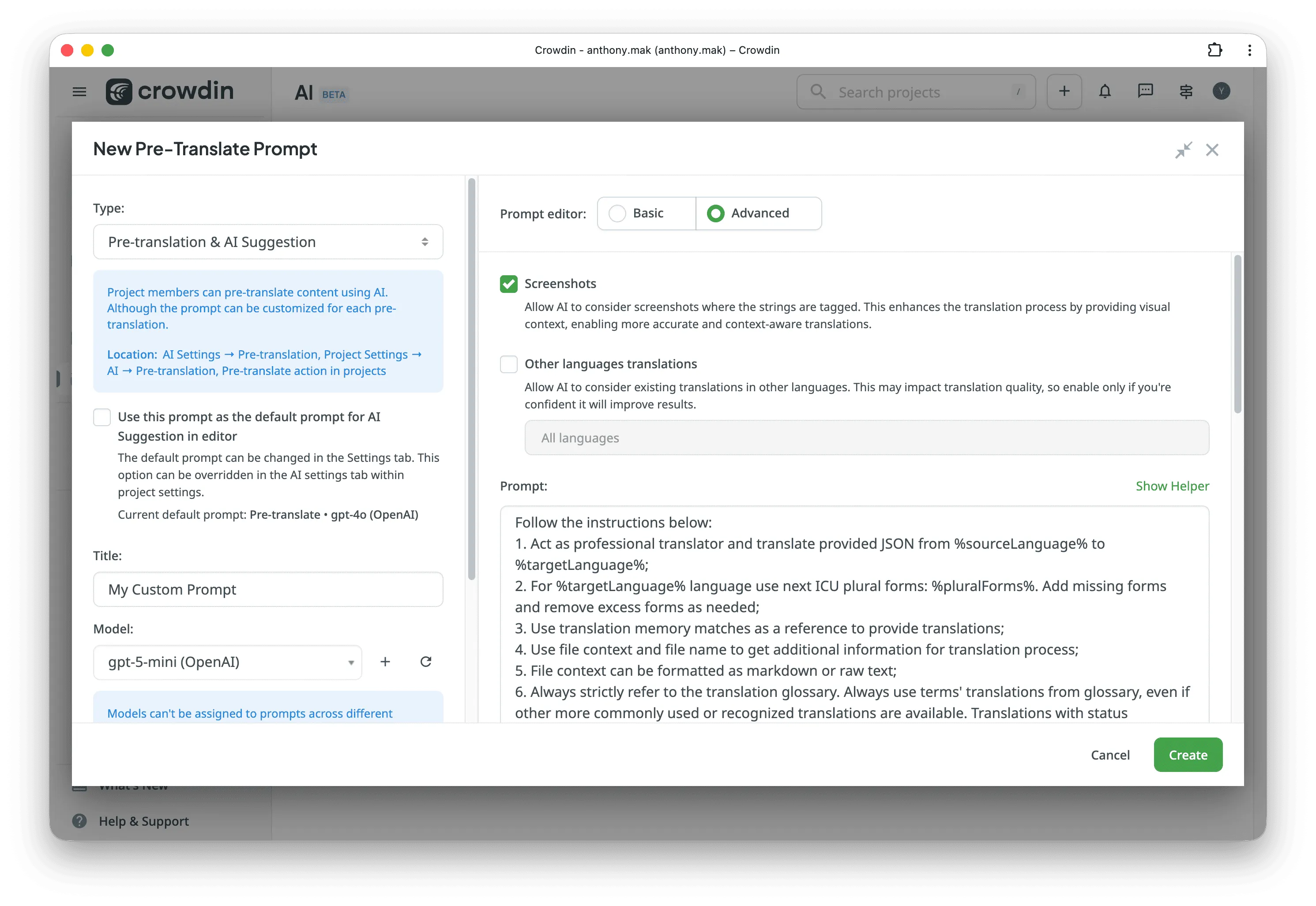
It produces a high-quality draft that is often 90% ready to publish, saving your human translators a massive amount of time.
We have a nice article written in collaboration with a professional linguist specifically about LLM prompts to use for your AI translations.
How Turo localized an entire ecosystem into Spanish in one week
Prompt Routing
While the AI Pipeline structures the workflow, Prompt Routing ensures the AI receives the exact instructions needed for specific languages and content types.
In standard setups, using one generic prompt for dozens of languages often leads to situations where the AI ignores specific grammar rules or cultural nuances. Prompt Routing solves this by dynamically swapping prompts based on the target language or file path.
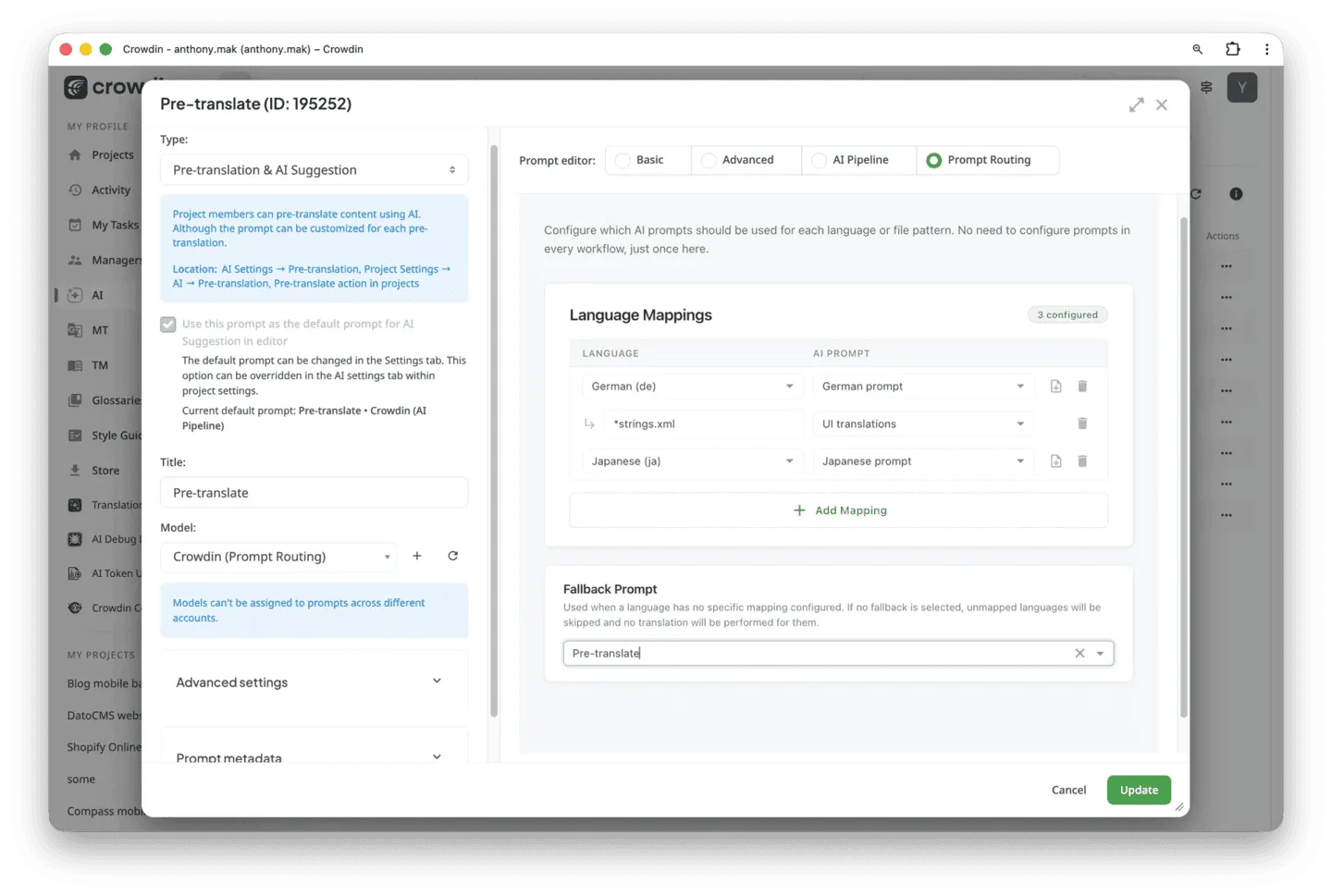
How it helps:
- Targeted instructions: Instead of one massive prompt, it delivers surgical instructions. For example, it can automatically trigger a politeness prompt for Japanese and a gender-neutral prompt for German.
- Prevents AI hallucination: By keeping prompts short and language-specific, you prevent the AI from hallucinating by a long list of rules for 20 different languages.
- Reduces management overhead: Managers no longer need to create 50 separate workflows. You map your logic once, and the router automatically applies the right rules to the right strings.
AI Debug
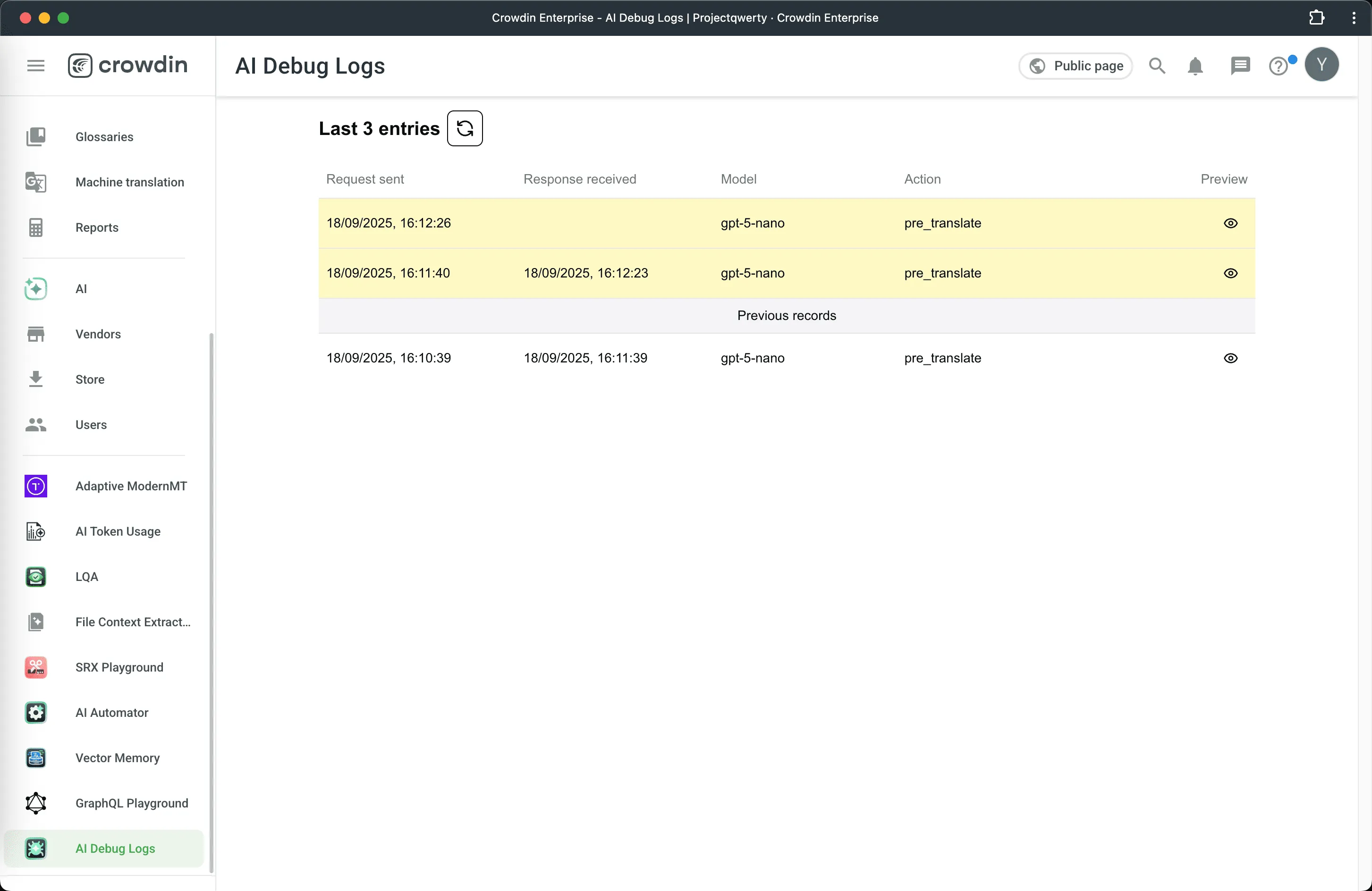
AI Debug isn’t a widely known app from the Crowdin Store, but it is really helpful. Connect this app to see your history of using AI in Crowdin. It shows the prompt you provided, the selected AI model, the AI’s response, and the context provided.
This app lets you analyze which model and prompt perform best for your needs.
Vector Cloud: Train AI on Your Brand Voice
The AI needs context to produce high-quality work, but not all context is in your Translation Memory. If you have old marketing copy or documents that have worked well for your business, you can upload them to the Vector Cloud app. It uses advanced technology to read these files and feed the most relevant information to the AI, ensuring factual accuracy and technical consistency across all your content.
You upload your files to the Vector Cloud:

And then, each time you make the AI pre-translation, your results will be “affected” by files that you’ve uploaded to the vector database (your unique style, word selection, etc.).

AI Assistant (In-Editor)
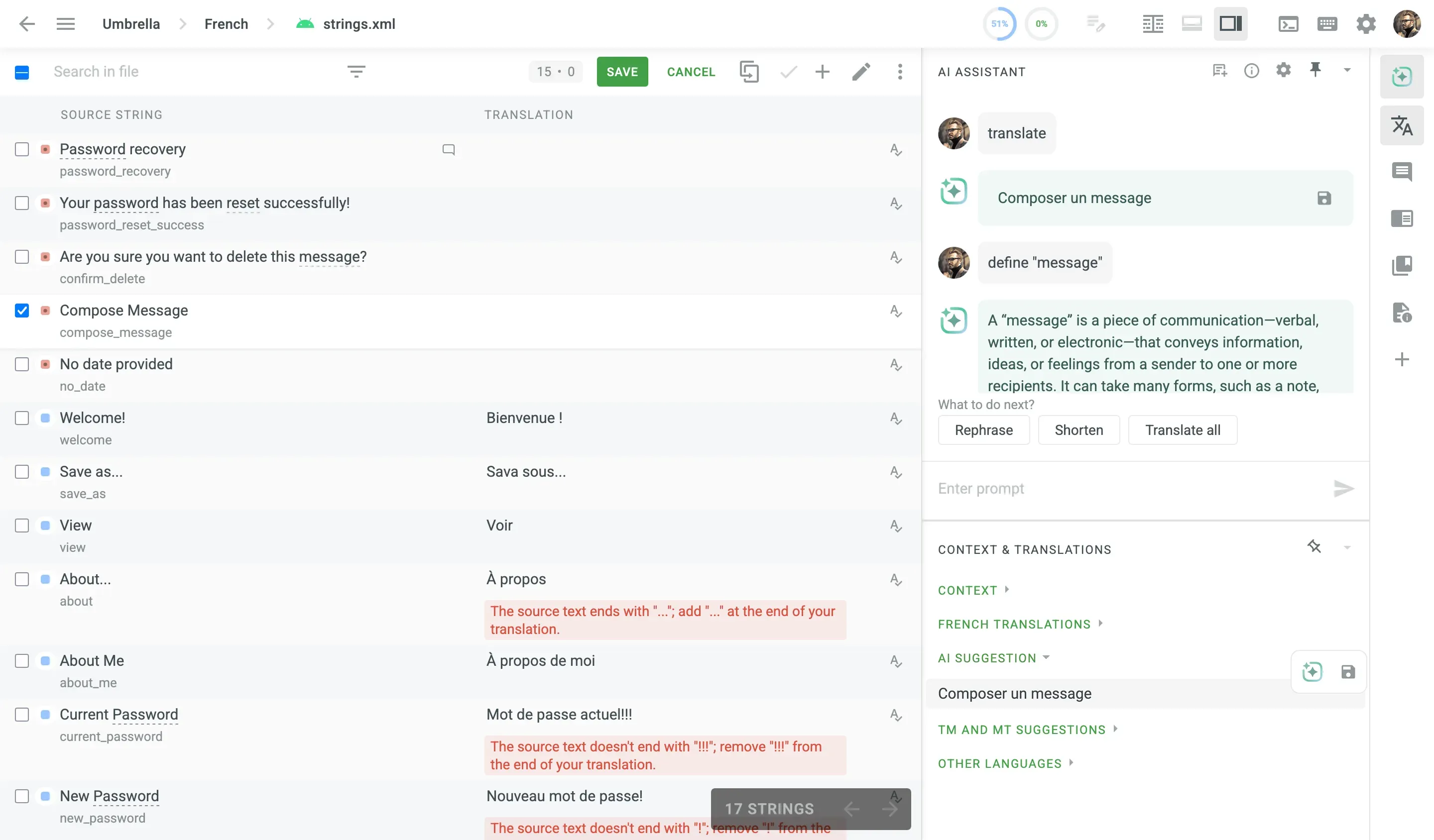
Think of the AI Assistant as a helpful partner sitting right next to you while you translate. It works directly inside the Crowdin Editor. If you need a sentence to be shorter, clearer, or just worded differently, you can ask the Assistant with a quick chat command. This tool speeds up micro-tasks, allowing the human translators to keep their focus on the meaning, not the manual cleanup.
AI Proofreader: Automate Post-Editing & Review
Every translation needs a final check, and this tool automates that step. The AI Proofreader uses AI to spot errors that standard QA checks often miss, like an incorrect tone or a subtle mistranslation based on context. You can set it up to run automatically as part of your workflow, making sure the translations are reviewed for quality and consistency before a human proofreader even steps in.
Why Use AI Proofreader?
- It provides an extra layer of review, detecting grammar and style errors that traditional QA features miss.
- You can customize AI prompts and use placeholders (like a style guide) to ensure translations meet your specific project standards.
- When enabled, it works in real-time, flagging issues just a few seconds after you type, dramatically reducing manual review time and accelerating your workflow.
- You can use it as an automatic real-time assistant or assign it as a dedicated proofreading task for final approval.
Dubbing Studio: Voiceovers and Video Localization
This tool helps you translate your multimedia content, such as training videos or podcasts. Dubbing Studio (integrated with ElevenLabs) uses AI to not only translate the script but also generate realistic, natural-sounding voiceovers in the new language. It includes a professional editor to fine-tune the audio, making it simple and cost-effective to create translated voice tracks. Localize your audio in the Crowdin platform.
Recently, we added a video dubbing feature so you can upload a video, get AI-generated transcriptions, and translate them in the Crowdin Editor. After that, you can choose voice, tune settings like speed, similarity, or style exaggeration. The feature is available for beta testing. Please apply using this form.
AI Style Guides
While context helps the AI understand what it is translating, style guides tell it how to speak. You can now attach your brand’s Style Guides directly to your AI prompts.
Instead of repeating “be professional but friendly” in every prompt, the AI automatically pulls rules from your linked Style Guide – such as whether to use the Oxford comma, how to handle measurements, or which grammatical person to use. This ensures that whether the AI is translating into Spanish or Finnish, the brand voice remains perfectly consistent without cluttering your main instructions.
Custom AI Module: Bring Your Own Model (BYOM)
The localization world is always changing, and new AI models are released all the time. The Custom AI Module gives you the freedom to connect these new or unique AI providers to Crowdin, even if the platform does not have a built-in integration yet. This module ensures your Crowdin setup can grow and change along with the latest advancements in AI technology.
You can find even more AI tools in the Crowdin Store.
How to Create an AI-Powered Localization Workflow
| Step | Action/Tool | How it works |
|---|---|---|
| 1. Preparation | Context Enrichment with AI Agents + Vector Cloud | All source code context is automatically uploaded. All style guides are uploaded to the AI’s memory bank. |
| 2. Brand Alignment | AI Style Guides | Defined brand voices and personas are integrated directly into the AI’s logic, ensuring the tone remains consistent across all languages without manual prompting. |
| 3. Logic Configuration | Prompt Routing | The system intelligently routes different content types to specific prompts or models based on complexity, language pair, or project requirements. |
| 4. Setting Pipeline | AI Pipeline | Create automated pipelines of AI actions. It pre-processes and refines your content through several layers of AI logic. |
| 5. Initial Draft | AI Pre-translate | The content is instantly translated. The AI uses its memory of your style and approved terms to create an on-brand first draft. |
| 6. Automated Review | AI QA Check | The AI automatically reviews its own work, checking for consistency and technical mistakes. It flags only the few sentences that need human attention. |
| 7. Human Polish | Human Translator (using AI Assistant) | A human only reviews a small number of flagged, complex sentences. They use the AI Assistant for quick rephrasing if needed. |
| 8. Project Management | Crowdin Copilot | An AI-powered assistant that automates routine management tasks, like bulk-fixing formatting across strings or summarizing project progress. |
| 9. Publish | Automated Integration | The finished translations are automatically sent back to your website or app code. |
| 10. Measure and Improve | Reports / AI Debug | Generate reports and check how much you saved on AI translations. Use the AI Debug tool to see the prompts and AI models that worked the best for your project. |
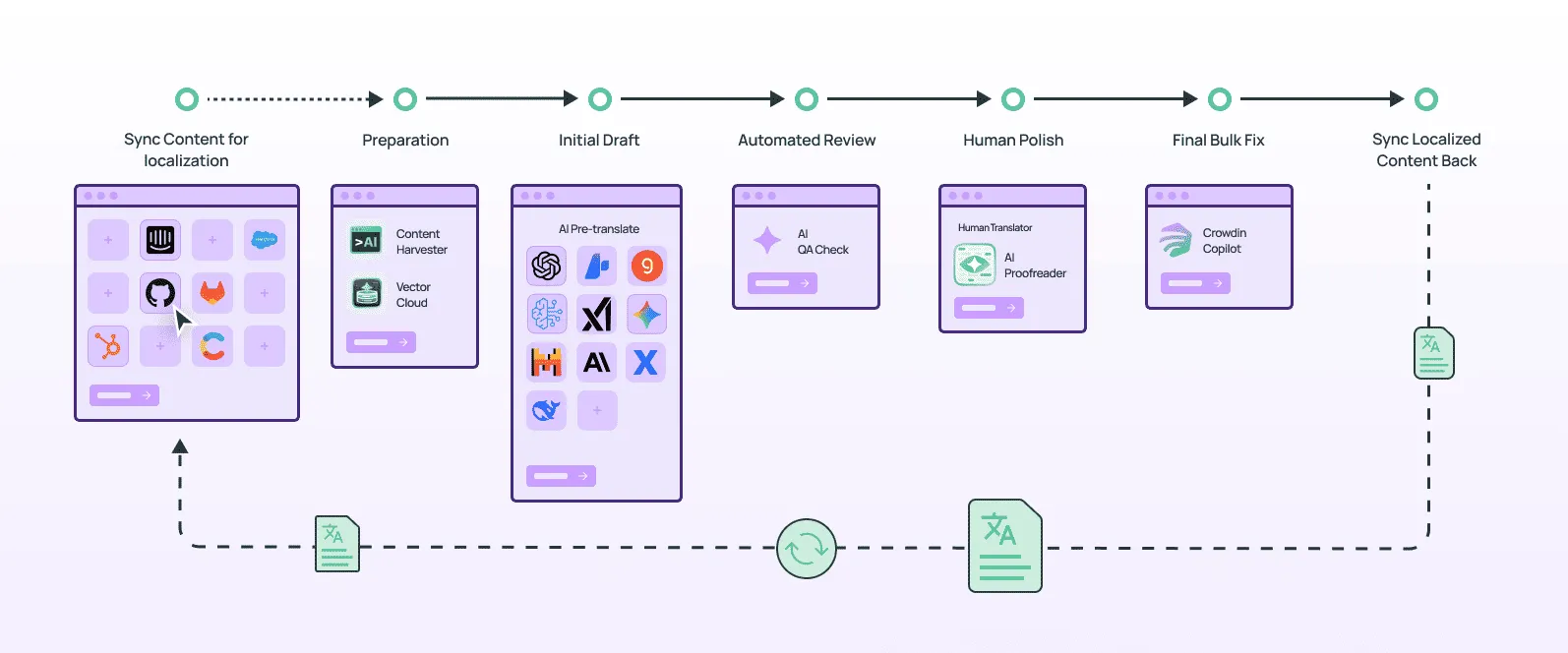
This example shows how a company can use these tools together to launch content faster than ever, with very little human effort required in the beginning. By using this flow, your human experts move away from simple translation and focus only on high-value and creative review. This makes the entire localization process fast and consistent.
Final Words
Everyone is talking about AI in localization. Some are afraid that it can steal their jobs, while others are shouting that AI provides awful results.
But the truth is that AI is just a tool, and you need to use it smartly. Build your own processes and implement AI smartly in your localization workflow. You will never get great results by using AI out of the box.
Localize your product with Crowdin
FAQ
Is it safe to use AI for localization? Can it train on my data?
To ensure safety, you can use your own API key. Connect to the AI provider using your company’s own secure key. This ensures your content is processed under non-training clauses, meaning the provider is legally bound not to store or use your text for general model training.
Moreover, Crowdin has signed contracts with AI partners to ensure that your data is not used to train or improve their models.
AI vs human translations in localization: which is better?
The combination of AI and human translations is the most effective. AI and humans do not compete, but they play different roles in the same workflow.
- AI is best for speed, scale, and technical consistency. It instantly handles high volumes of content, ensures that your terminology is correct everywhere, and performs the first layer of automated Quality Assurance (QA). This saves huge amounts of time and money.
- Human Linguists are essential for quality, nuance, and creative content. They catch cultural missteps, verify accuracy where stakes are high (like legal or marketing copy), and ensure the translation captures the correct emotional tone.
AI gets the job done faster and cheaper by automating the bulk work, and humans make sure it gets done right by focusing their expertise on the final, critical details.
How is AI used in localization?
AI (specifically Large Language Models or LLMs) is used to perform high-speed, high-volume pre-translation of content. It ensures the brand’s consistency and is used for automated quality assurance (QA) checks, reducing the human translator’s work to only a high-value, final review.
How do I automate content localization using AI?
Automation involves connecting your content source (like your code or CMS) to a Translation Management System (TMS) like Crowdin. The process is:
- Sync: New text is automatically pulled.
- Pre-translate: AI instantly creates the first draft.
- Review: Human experts polish the AI’s output.
- Publish: Approved translations are automatically pushed back to your website or app.
What is the best AI localization tool?
The best tool is an all-in-one TMS that provides AI features and workflow automation. Crowdin and Crowdin Enterprise are localization platforms that integrate with top AI models, providing human-in-the-loop tools. With Crowdin, you can build a custom AI-powered workflow.
Who offers AI-based localization services?
AI localization is offered by two main groups:
- AI Localization Platforms: Platforms like Crowdin allow your internal team to manage the AI-human workflow.
- AI-Powered Language Service Providers (LSPs): Traditional translation agencies that have adopted AI to offer post-edited machine translation (PEMT) services, where they use AI and then have a human editor finalize the work.
What AI localization tool is best for collaboration?
Tools built on the TMS model, like Crowdin, are best for collaboration. They provide a central platform where developers, AI, project managers, and human linguists can all work together on the same content in real-time.
What is a context-based AI localization tool?
In an AI localization tool like Crowdin, “context-based” means the AI is fed your technical glossary, brand style guides, and even screenshots to make the output grammatically correct, on-brand, and technically accurate.

Yuliia Makarenko
Yuliia Makarenko is a marketing specialist with over a decade of experience, and she’s all about creating content that readers will love. She’s a pro at using her skills in SEO, research, and data analysis to write useful content. When she’s not diving into content creation, you can find her reading a good thriller, practicing some yoga, or simply enjoying playtime with her little one.