

This October, Crowdin Copilot started working on its own: automations run your instructions on a schedule, on Crowdin events, or from a webhook. AI agents can now also run your integration apps, so one chat message can bring content from a connected platform into Crowdin, have it translated, and send the translations back. Crowdin Enterprise got a redesigned interface that’s easier to use, and a new skill lets your coding agent capture a screenshot for every string, so translators see where it appears. The Editor, reports, and apps also got improvements.
Crowdin Copilot: automations that run without you
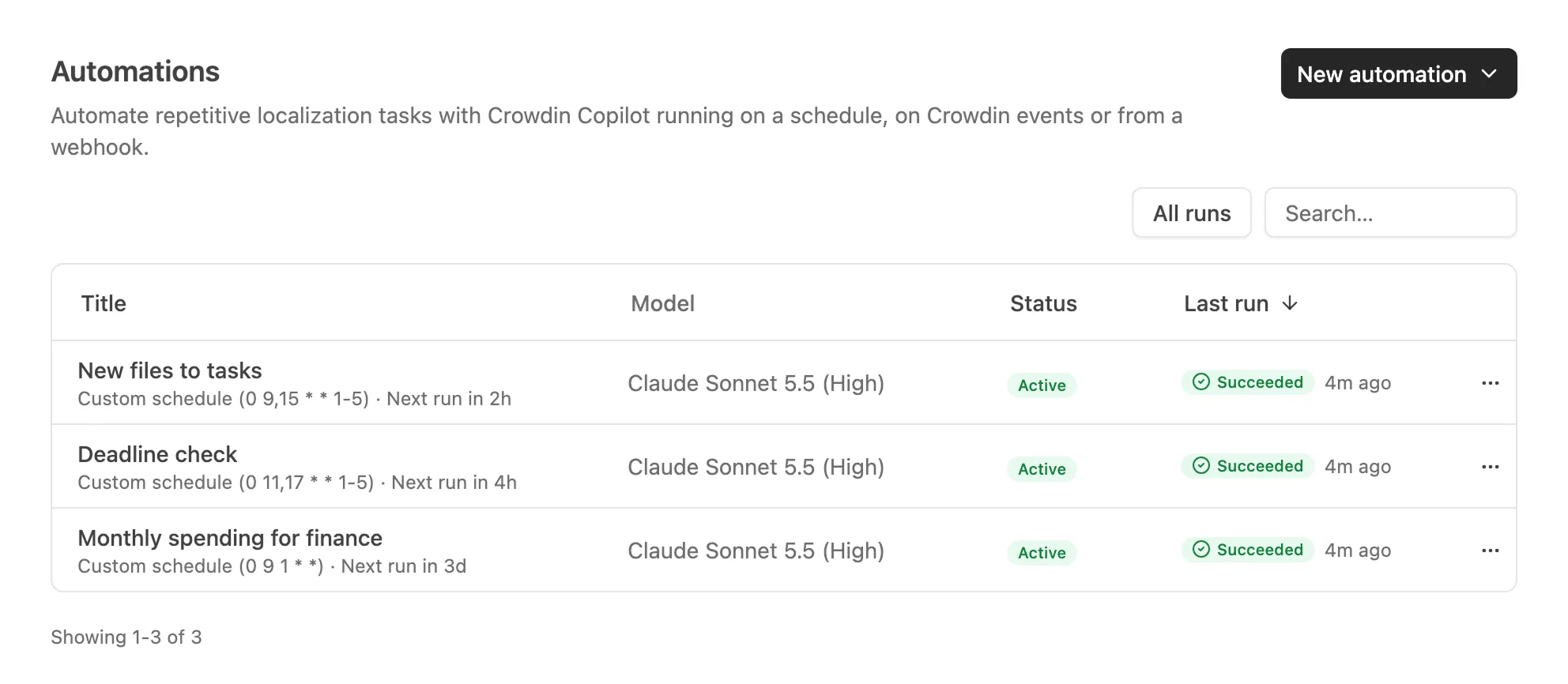
Crowdin Copilot can now do your routine Crowdin work on its own. An automation is a plain-language instruction plus the triggers that start it. Describe it in the chat or type /automate, and Copilot saves it under Automations in the sidebar. It then runs as you, without you in the chat.
An automation starts:
- On a schedule: hourly, daily, weekly, or on a custom cron schedule.
- On a Crowdin event, such as a new file or German reaching 100%.
- From a webhook, for example, after a deploy.
A run can do what Copilot does for you in the chat, and you can open it to see what it did and why. If some actions weren’t allowed, the run ends as Needs attention: allow them in the run’s chat or change the instruction, then retry.
A few use cases:
- When new strings are added, pre-translate them with AI and create a proofreading task for a person to review.
- Twice a day, turn new files into translation and proofreading tasks.
- Twice a day, comment on tasks at risk of missing their deadline.
- Once a month, sum up spending for finance.
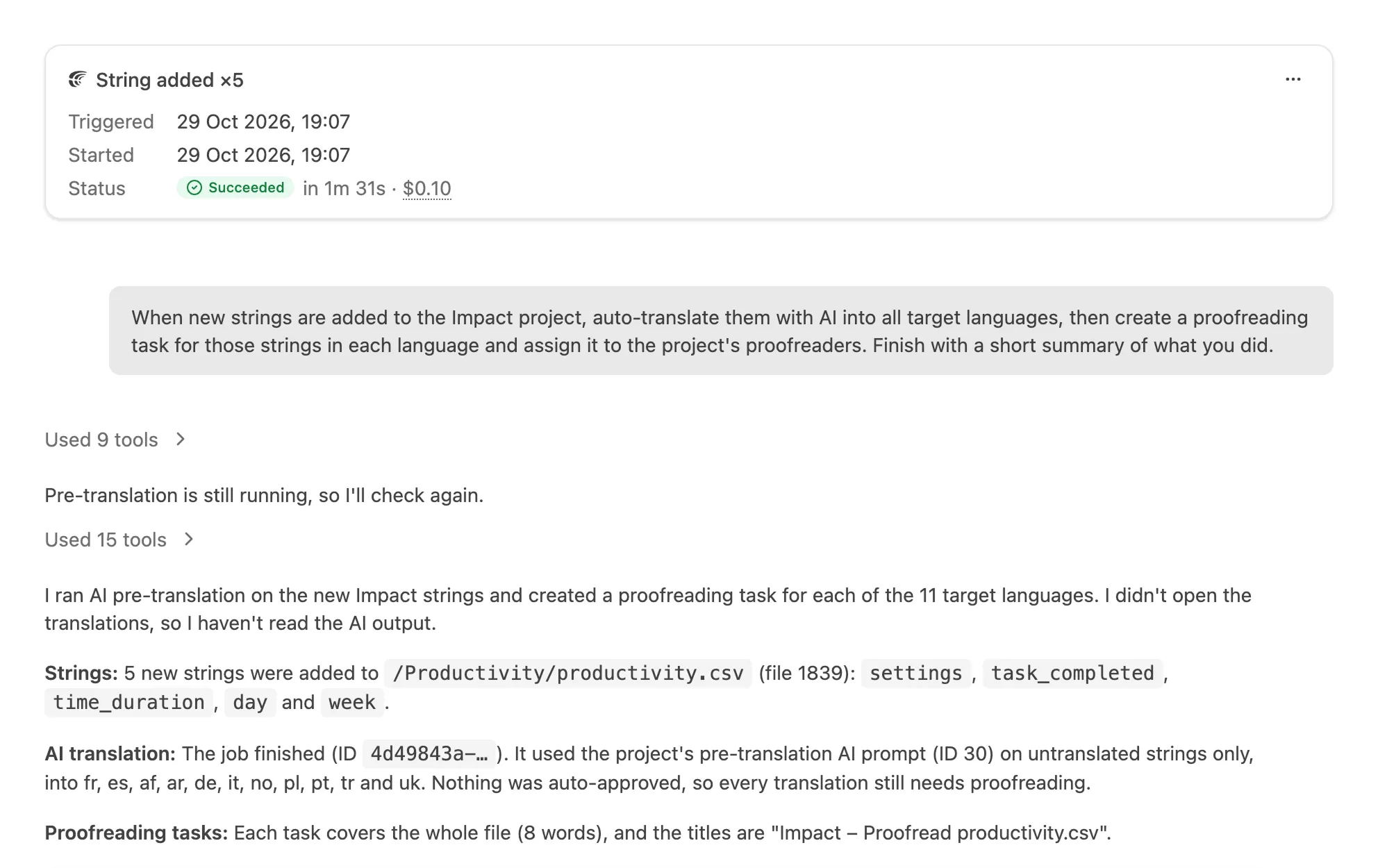
Runs cost $0.10 per 20 minutes in Crowdin Credits, not counting model usage. If credits run out or 10 runs fail in a row, the automation turns off, and a notification tells you why.
Integration apps: sync your content from an AI agent
An AI agent can now run your installed integration apps. Ask it to translate the latest blog posts on your Webflow site into your target languages, and it reads the content from the app, imports it into Crowdin, has it translated there, and pushes the translations back. It can also read or change the app’s auto-sync schedule. It works with the Box, Braze, commercetools, Hygraph, Intercom, Klaviyo, Webflow, and YouTube apps, and the agent acts with your own permissions.
In Crowdin Copilot, Cowork, Claude.ai, or ChatGPT, the agent works through the Crowdin connector. In a terminal or a CI job, it uses Crowdin CLI 5.4.0: crowdin app methods lists what an installed app can do, and crowdin app api calls it, with a token that has the application.proxy scope. The new integration-sync skill gives an agent the whole loop on either path and shows every change before it sends it.
Beyond integrations, agents can now reach more of what managers do in the UI. New endpoints in the Crowdin API and the Crowdin Enterprise API list webhook deliveries and let you resend one or send a test. In Crowdin, they also cover project discussions and your account’s managers.
Crowdin Enterprise: a redesigned interface
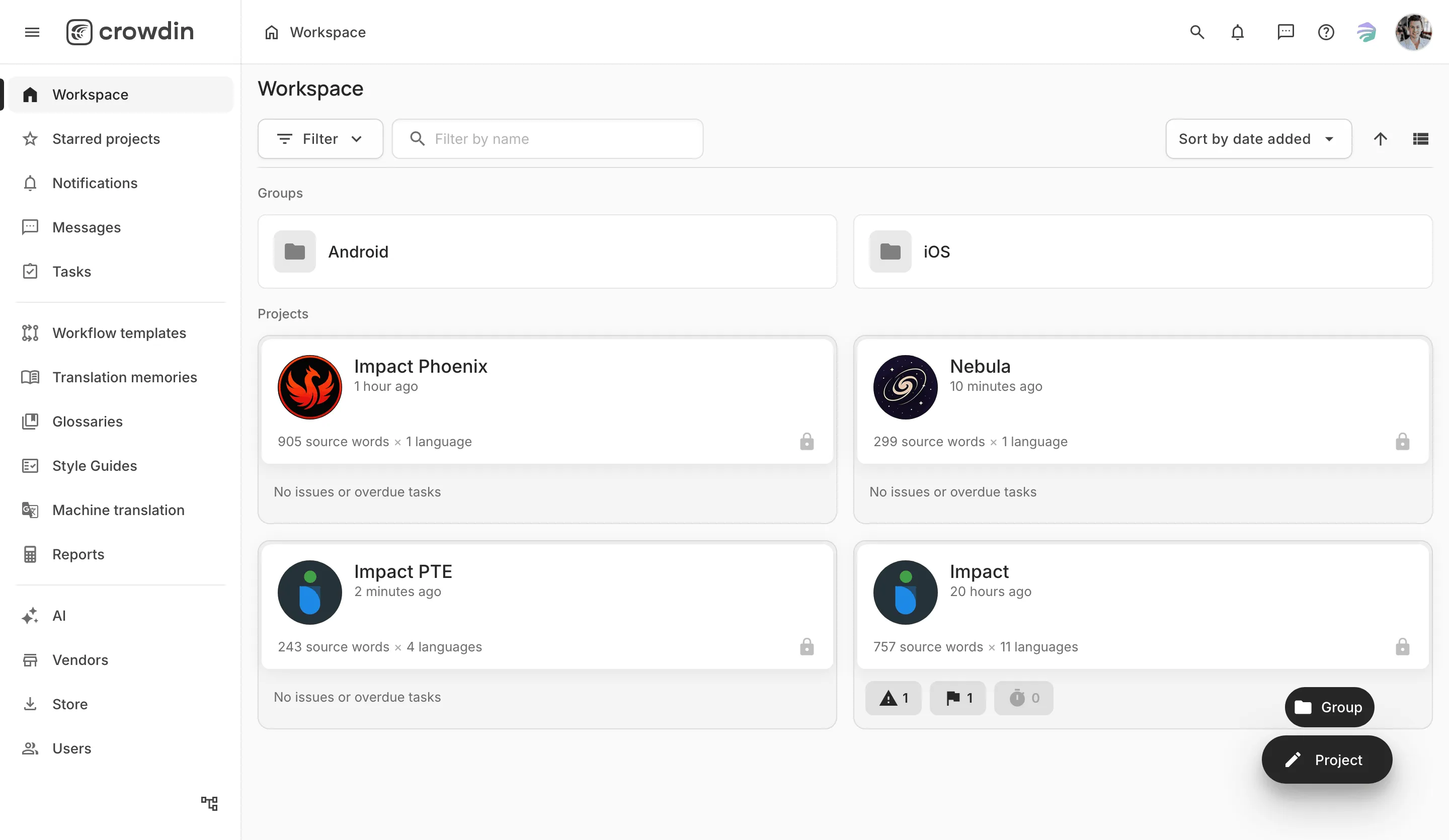
We reviewed the Crowdin Enterprise interface and redesigned it to be easier to use, polishing many small details along the way.
Pages look cleaner and are easier to read: cards are flat with thin borders instead of shadows, and headings and text follow a clear hierarchy. It’s also easier to see what the system is doing. Status badges look the same on every page, and long operations, such as merging a branch, show their progress. On a phone, the main menu slides out from a menu button, and in auto mode the theme follows your system from the moment a page starts loading.
Localization Costs app: what each language costs, people and AI together
The new Localization Costs app from Crowdin Store adds a report that shows how much each target language costs for the projects and period you choose, split into contributor work and AI. Contributor work is priced with your rates template, the same way the Translation Costs report does, and the AI costs come from the AI usage of the same projects. Open a language to see the AI actions, prompts, models, and providers behind its cost. Use it to plan budgets by market or to charge costs back to clients and teams.
Once you install it, the report appears under Reports in a project, and in Crowdin Enterprise also in the organization’s and each group’s Reports. Currencies aren’t converted: contributor costs stay in your template’s currency, and AI costs are in USD.
Localize your product with Crowdin
The generate-screenshots skill: every string on the screen it lives on
A bare “Save” could be a button, a menu item, or a dialog title, and each translates differently. A screenshot answers that for every string visible on it, and the new generate-screenshots skill lets your coding agent take those screenshots for you.
The agent finds the strings in your Crowdin project that have no screenshot yet and groups them into the screens of your app. You review that plan and sign in to the app once yourself, so the agent never handles your password. It then captures each screen with your project’s own UI tooling: Playwright for web apps, Maestro for iOS, Android, React Native, and Flutter, XCUITest for native iOS, or computer use for desktop apps. The screenshots go to Crowdin with auto-tagging, and the agent finishes with a list of the strings still without a screenshot and the reason for each.
The capture setup stays in your repository, so after the next release the agent only tops up what changed.
The glossary-term-translations skill: glossary translations from your own project
Your translators have usually translated a term many times already, inside the strings that use it. The new glossary-term-translations skill brings those translations into your glossary. It finds the project’s strings that contain each term, reads their final translations, and picks the word each language uses, showing how many strings agree, such as 3 of 4. When strings disagree, you choose. When no translation shows a clear counterpart, the skill leaves that language empty rather than guessing.
The skill shows each batch of terms before writing anything and adds them as Draft terms, which QA checks ignore until someone reviews them. It works through the Crowdin connector and is built into Crowdin Copilot.
Editor: edit translations in place, see their history, and switch tasks
You can now edit a translation instead of adding a new one: proofreaders can edit any translation, and translators their own until it’s approved. The new History section shows what happened to a string’s translations, and you can restore an earlier version.
For tasks done by your own translators and proofreaders, the Task menu now has a Status group, and Open Task… (Ctrl+Shift+O, or Shift+Command+O on macOS) switches to another task. Picking a guide in the Style Guides section now shows it right in the panel, next to your strings.
Audit log: who changed what in your organization, and when
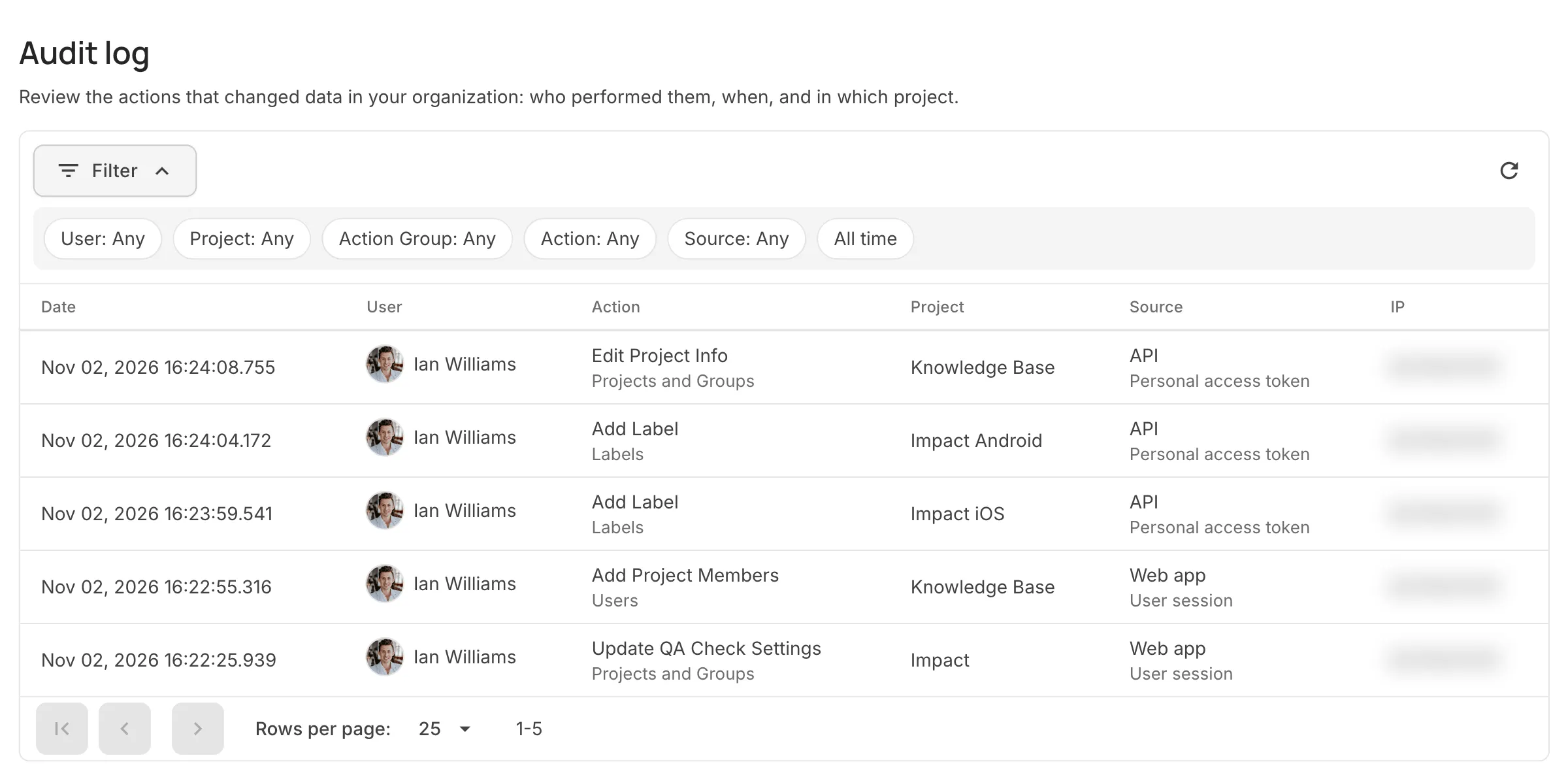
The new Audit log in Crowdin Enterprise brings the changes made in your organization into one list, whether people made them in the web app or scripts and apps made them through the API. Each entry shows who made the change, when, and in which project, so when a project’s settings change or someone loses access, you have a clear audit trail to trace it back. Open an entry to see the request with its parameters and, if a script or an app made the change, the personal access token or OAuth app behind it. It’s in Organization Settings, and only the organization owner and admins can see it. The Audit log is available only on the Business plan.
Other platform updates
AI
- Crowdin Copilot now has its own button in the top bar, even when other apps open in the same side panel, and you can resize that panel by dragging its left edge. The width you set is kept. Inside Copilot, a sidebar lists your chats, and you can search them.
- The Crowdin AI provider has a new Region setting: the AWS region that Crowdin AI uses for your requests. Leave it empty for the default region, enter
globalfor cross-region inference, or enter a region code such aseu-central-1to choose where your requests are processed. See Crowdin AI. - Crowdin in ChatGPT and Codex. The Crowdin plugin is now in the ChatGPT plugin directory. It connects ChatGPT and Codex to your Crowdin projects, so you can check translation progress, find strings and glossary terms, or review tasks and reports from a chat, and it asks before it changes anything. In Codex, it also brings the Crowdin skills for setting up localization in a repository.
Editor and files
- Find the strings that still carry an untouched auto-translation. The Editor’s Machine Translations filter is now Auto-Translated, with TM, MT, and AI options, and it shows only strings whose final translation came from auto-translation and hasn’t been edited or replaced since. In the Advanced Filter, Engine does the same when Scope is set to Final translations.
- iOS Strings exporter settings have a new Export context option. Clear it to leave out the context comment written above each string. It’s on by default and applies both to bundles and to iOS Strings exports from string-based projects.
- Custom placeholders now accept the
wordboundaryandnonwordboundaryelements that verbal expressions already supported. - Auto-tag screenshots by file, folder, or branch. When you auto-tag screenshots in bulk, Match strings from now limits the matching to one file, folder, or branch. Tags are replaced only on screenshots that get matches, and the rest keep their tags.
Reports
- Every built-in report now explains how its numbers are calculated, and a Discuss with Copilot button opens Crowdin Copilot to go through the report with you.
- Custom rates that apply to nobody stay visible. When a cost report uses a rates template, a custom rate set that matches none of the report’s languages or people is now shown marked Not applied, with the reason.
Vendors
- Undertow, a new vendor (Crowdin only). In the task wizard, Undertow now appears under Crowdin-Managed Payments: its linguists translate or proofread your strings in 20 languages, from $0.139 per word, and you pay from your Crowdin balance or at checkout. To keep costs down, pair AI auto-translation with an Undertow proofreading task. You pay the task’s maximum price up front, and if the proofreading costs less, the difference goes back to your Crowdin balance.
Crowdin Enterprise
- External QA checks can now stop a translation from being saved. For apps that support it, each check gets a Save translations setting. With Error, a translation that fails the check isn’t saved, whether it comes from the Editor, a file upload, the API, or auto-translation. Warning is the default. See the External QA Check module.
- Crowdin employee access. A new Allow access to Crowdin employees option in Organization Settings > Security decides whether Crowdin Support can sign in to your organization to help with your requests. It’s on by default, and every sign-in is recorded. With it off, some requests take longer to resolve.
- Filter by a team. In the Editor’s Advanced Filter, Translated By and Approved By can now be set to one of the project’s teams, not only to one person.
Apps and integrations
- Organization reports from apps, in Crowdin Enterprise. A new Organization Reports module lets an app add its own report to the organization’s Reports, and in permission granularity mode to each group’s Reports as well.
- Keep dots in names, a new key naming option in Crowdin for Figma, keeps the dots in page, frame, layer, collection, and variable names as key separators instead of replacing them with underscores, so the structure of your Figma names becomes nested keys.
- API errors name the missing scope. When a request fails because the token doesn’t have the scope the endpoint needs, the 403 response now says which scope to add. Endpoints that Crowdin apps can’t call at all now say so in the response.
- Crowdin CLI.
crowdin auto-translate --asyncstarts a run and exits, so CI doesn’t wait for a long AI job, andauto-translate statusandauto-translate listcheck on it later.crowdin screenshot uploadnow also takes a whole directory of images, subfolders included, and CLI 5.5.0 addscrowdin ai-prompt list, which finds the prompt ID that an AI auto-translation run needs.
Crowdin Store updates
- Auto-Translate Planner, a new free app, auto-translates each file with its own method and languages. You set rules that match files by pattern, as in
crowdin.yml, and send them through AI, a machine translation engine, or your TM when files are uploaded or updated. History shows what each run translated and why some strings weren’t. - Project Duplicator now copies a project’s members with their roles and languages, and in Crowdin Enterprise its teams as well, matching roles to the steps of the workflow you pick. Files, strings, translations, and TM or glossary entries are never copied. Duplication also works through the API: preview a copy, start it, and check its status, as described in the Project Duplicator API reference.
- Copilot skills in the Store now include Crowdin CLI, How to Crowdin, and Integration sync. How to Crowdin is also built into Crowdin Copilot.
- Intercom: a new Fin settings tab decides whether Fin can use your translated Help Center articles in its AI answers, with separate Service, Sales, and Copilot switches, all on by default. The choice applies to each translated language when translations are synced to Intercom.
- AI Pipeline: Default reasoning effort has a new Model default option. The default prompts of the Ambiguity Filter and Artifact Correction steps now include the project’s style guide, the same one the Translate step uses. With AI Pipeline installed, a new Auto-Translate prompt opens in the AI Pipeline editor with the app’s model preselected, and AI Pipeline is listed first, marked Recommended.
- Infogram now works with team libraries as well as your personal one: add one or more Team IDs, and each library gets its own folder. Each chart sheet now comes in as one table, and multi-page designs get a context screenshot for every page.
- Webflow has a new Delete obsolete Crowdin source files option under Settings > Advanced. When content no longer exists in Webflow, the app deletes its source file from Crowdin instead of flagging it as Sync failed. It’s off by default. Deleting a source file also removes its translations from the project, though Translation Memory keeps a copy.
- A new connector interface that follows Crowdin’s light and dark theme is live in AWS S3, Braze, Infogram, Intercom, Notion, and Webflow. Error logs is now Logs, with search, and Log out has moved to Disconnect integration in Settings.
New podcast episodes
Four new episodes of the Agile Localization Podcast came out this month:
- How Kahoot! Localizes for Everyone: Inside the Strategy – Maria Saez, Localization Manager, and Gabriele Spiteri, Localization Program Manager at Kahoot!, on what to centralize and what to decentralize across 22 languages, when to trust AI with a translation, and why linguistic equivalence isn’t their main measure of success.
- Why the best LLM doesn’t exist: TAUS’s Anne-Maj van der Meer on localization’s next chapter – Anne-Maj van der Meer, Head of Growth at TAUS, on why cultural nuance, not accuracy, is the real AI challenge in localization, and why no single LLM wins on cost, latency, and dialect support at once.
- LocWorld’s next chapter: CEO Renato Beninatto on building the industry’s biggest tent in Vancouver – Renato Beninatto, CEO of LocWorld, on the event’s new playbook and its “From Chaos to Order” AI theme ahead of Vancouver.
- When AI makes translation affordable, cultural context becomes the differentiator – Sean Hopwood, Founder and CEO of Day Translations, on why fluency is only the starting point and how cultural context earns client trust across 116 languages.
You can listen to all episodes on Apple Podcasts, Spotify, or YouTube.
Crowdin Connect: our first community event in Tallinn
On October 7, we hosted Crowdin Connect in Tallinn – our first on-site event for the localization community. The format left more room for conversation than a typical conference, with time to share how AI is changing their work and to meet peers facing the same questions.
The program included:
- A keynote by Andreas Ekström on why new technologies take time to pay off and what that means for AI today
- A talk by Oksana Naidjonova (Bolt) on how Bolt’s localization team adopted AI
- A panel discussion, “Localization is no longer one team’s problem”, with Mantas Baraišis (Nord Security), Mehmetcan Boz (Wise), and Ingrid Kirikal (Pipedrive), moderated by Sofiia Hapon
Thank you to our speakers, panelists, and every guest who joined us.
Read the event recap on MultiLingual and the panel highlights in our LinkedIn article.
External tools
This month we released new versions of:
- Crowdin CLI 5.5.0, 5.4.0
- GitHub Action v3.5.0, v3.4.0
- JS API Client 1.59.2, 1.59.1
- Java API Client 1.37.0
- PHP API Client 1.26.0
- .NET API Client 2.46.0, 2.45.1
- Ruby API Client 1.15.1, 1.15.0
- Go API Client v0.19.0
- Apps SDK 3.14.0, 3.13.0, 3.12.0, 3.11.0, 3.10.0, 3.9.0, 3.8.0, 3.7.0, 3.6.0
- Unity Plugin 0.13.1, 0.13.0
- Crowdin shadcn UI Registry 1.2.0
That’s October. Try one thing: ask Copilot to turn a routine you repeat into an automation. See you next month.
Localize your product with Crowdin

Crowdin Team